In this example you will learn how to map one-to-many relationship using Hibernate Annotations. Consider the following relationship between Student and Phone entity.
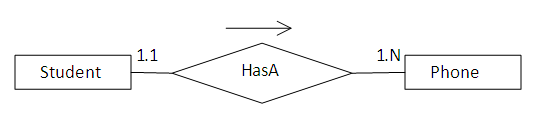
According to the relationship a student can have any number of phone numbers.
To create this relationship you need to have a STUDENT, PHONE and STUDENT_PHONE table. The relational model is shown below.

To create the STUDENT and PHONE table you need to create the following Java Class files.
Student class is used to create the STUDENT and STUDENT_PHONE table.
01.package com.vaannila.student;02. 03.import java.util.HashSet;04.import java.util.Set;05. 06.import javax.persistence.CascadeType;07.import javax.persistence.Column;08.import javax.persistence.Entity;09.import javax.persistence.GeneratedValue;10.import javax.persistence.Id;11.import javax.persistence.JoinColumn;12.import javax.persistence.JoinTable;13.import javax.persistence.OneToMany;14.import javax.persistence.Table;15. 16.@Entity17.@Table(name = "STUDENT")18.public class Student {19. 20.private long studentId;21.private String studentName;22.private Set<Phone> studentPhoneNumbers = new HashSet<Phone>(0);23. 24.public Student() {25.}26. 27.public Student(String studentName, Set<Phone> studentPhoneNumbers) {28.this.studentName = studentName;29.this.studentPhoneNumbers = studentPhoneNumbers;30.}31. 32.@Id33.@GeneratedValue34.@Column(name = "STUDENT_ID")35.public long getStudentId() {36.return this.studentId;37.}38. 39.public void setStudentId(long studentId) {40.this.studentId = studentId;41.}42. 43.@Column(name = "STUDENT_NAME", nullable = false, length = 100)44.public String getStudentName() {45.return this.studentName;46.}47. 48.public void setStudentName(String studentName) {49.this.studentName = studentName;50.}51. 52.@OneToMany(cascade = CascadeType.ALL)53.@JoinTable(name = "STUDENT_PHONE", joinColumns = { @JoinColumn(name ="STUDENT_ID") }, inverseJoinColumns = { @JoinColumn(name ="PHONE_ID") })54.public Set<Phone> getStudentPhoneNumbers() {55.return this.studentPhoneNumbers;56.}57. 58.public void setStudentPhoneNumbers(Set<Phone> studentPhoneNumbers) {59.this.studentPhoneNumbers = studentPhoneNumbers;60.}61. 62.}
The @OneToMany annotation is used to create the one-to-many relationship between the Student andPhone entities. The @JoinTable annotation is used to create the STUDENT_PHONE link table and@JoinColumn annotation is used to refer the linking columns in both the tables.


No comments:
Post a Comment